|
|
|
|
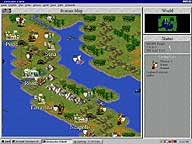
Be the ruler of your own empire! Manage your resources to build the world's most powerful civilization. You can instate democracy or rule with an iron fist. Erect monuments to celebrate your people's glory or develop the principles of law, science, and technology. As your society grows, it will attract the attention of history's most ingenious leaders. Negotiate alliances with them, or have your armies drag them groveling to your throne.
|
|
|
| What You'll Need |
|
|
- A FREE Zone Name and password (Sign up now!)
- Civilization II Multiplayer retail game software (check game's documentation for specific system requirements)
- Windows 95/98, or NT 4.0 or later with System Pack 3
- Microsoft Internet Explorer version 3.02 or later, or Netscape Navigator version 4.0 or later
|
|
| How to Play |
|
|
- Sign up for a FREE Zone membership.
- Once you have a Zone membership, you can play Civilization II Multiplayer anytime you want. Enter your Zone Name and password to log on to the Zone and select a game room.
- Make sure you have the game CD-ROM in your drive.
- Hosting and joining a game are easy: To host, click an empty table, then wait for other players to join. Launch the game once you have enough players. To join, click a table already occupied by one or more players and wait for the host to launch the game. You can find out more about hosting and joining in our Tutorial
.
|
|