|
|
|
|
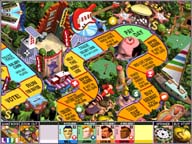
The Game of LIFE, one of Hasbro's classic board games, is back! And it's more fun than before! Put away your fold-up cardboard game, turn on your computer, and start up this new 3-D multiplayer version of the Game of LIFE. As you're cruisin' down the road of life, stop and smell the roses. Or in this case, check out the cool graphics, wild animations, and totally rad sounds!
|
|
|
| What You'll Need |
|
|
- A FREE Zone Name and password (Sign up now!)
- Game of LIFE retail game software (check game's documentation for specific system requirements)
- Windows 95/98, or NT 4.0 or later with System Pack 3
- Microsoft Internet Explorer version 3.02 or later, or Netscape Navigator version 4.0 or later
|
|
| How to Play |
|
|
- Sign up for a FREE Zone membership.
- Once you have a Zone membership, you can play Game of LIFE anytime you want. Enter your Zone Name and password to log on to the Zone and select a game room.
- Make sure you have the game CD-ROM in your drive.
- Hosting and joining a game are easy: To host, click an empty table, then wait for other players to join. Launch the game once you have enough players. To join, click a table already occupied by one or more players and wait for the host to launch the game. You can find out more about hosting and joining in our Tutorial.
|
|