|
|
|
|
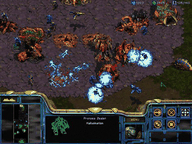
StarCraft puts you in command of one of three distinct races -- the adaptable Terrans, the swarming Zerg, or the enigmatic Protoss -- as you harvest minerals and vespene gas, build a base, and forge an army to overrun your rivals. Each race plays completely differently, allowing for a different and fresh experience every time you play. Battle it out over Battle.net or LAN on classic maps like Lost Temple, Hunters, and Big Game Hunters. The Zone's online community for StarCraft is enormous, so you'll never have trouble finding players to go up against. Prepare for a real-time slugfest.
|
|
|
| What You'll Need |
|
|
- A FREE Zone Name and password (Sign up now!)
- StarCraft retail game software (check game's documentation for specific system requirements)
- Windows 95/98, or NT 4.0 or later with System Pack 3
- Microsoft Internet Explorer version 3.02 or later, or Netscape Navigator version 4.0 or later
|
|
| How to Play |
|
|
- Sign up for a FREE Zone membership.
- Once you have a Zone membership, you can play StarCraft anytime you want. Enter your Zone Name and password to log on to the Zone and select a game room.
- Make sure you have the game CD-ROM in your drive.
- Hosting and joining a game are easy: To host, click an empty table, then wait for other players to join. Launch the game once you have enough players. To join, click a table already occupied by one or more players and wait for the host to launch the game. You can find out more about hosting and joining in our Tutorial.
|
|